
Visual research is an important stage in many creative projects. Before moving into making or production, students often collect images, references, materials, and visual inspirations that help shape the direction of their work. Mood boards are commonly used to organise these references and communicate a visual language for a project.
AI image generation tools can support this stage of the creative process by helping students quickly explore visual directions, generate references, and experiment with aesthetics. When used carefully, AI-generated imagery can become part of a broader process of visual research rather than replacing traditional forms of inspiration and investigation.
This post explores how AI can support visual development and mood board creation in creative arts education.
A short practical exercise
Building an AI-assisted mood board
This short activity helps tutors explore how AI-generated imagery might support visual research.
Step 1: Choose a simple theme
Select a theme that might be used in a creative brief, such as:
- Future cities
- Digital nostalgia
- Sustainable fashion
- Hybrid nature and technology
Step 2: Generate visual references
Use an Adobe Firefly to create several images related to the theme. Try experimenting with prompts that:
- Explore different colour palettes
- Explore different visual styles
- Explore different environments or materials
- Generate multiple variations
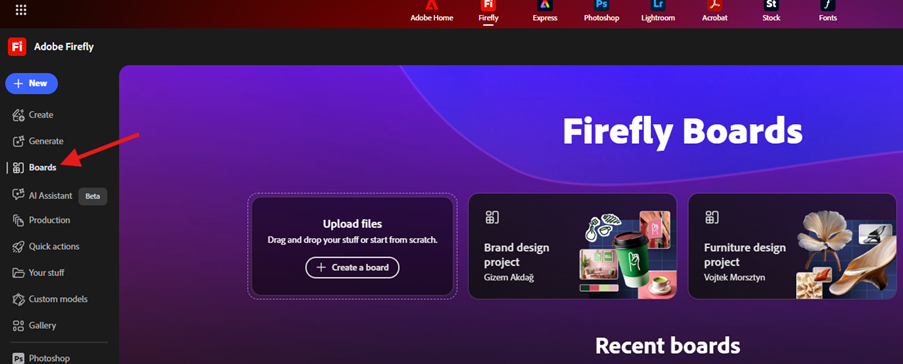
You might want to try out the “Board” feature in Firefly, located on the left side of the screen when you log in:
Step 3: Curate the images
Select a small number of generated images that feel interesting or relevant. Avoid simply choosing the most visually striking ones; consider which images best communicate a mood or direction.
Step 4: Combine with other references
Add other visual sources such as:
- Photographs
- Artworks
- Design references
- Textures or materials
Arrange these elements into a simple mood board.
Step 5: Reflect on the process
Consider the following questions:
- How did the AI-generated images influence the visual direction of the board?
- Did they introduce unexpected ideas or aesthetics?
- How might students critically evaluate these images when using them as references?
This activity emphasises the importance of selection, interpretation, and visual judgement when working with AI-generated imagery.
Key risks and limitations
As with other uses of AI in creative practice, there are several limitations to be aware of.
AI-generated images can sometimes reflect similar aesthetics or visual patterns, particularly when trained on widely available online image. AI-generated images may appear convincing but often lack cultural, historical, or conceptual depth.
Questions remain around how AI models are trained and how existing creative work may influence generated outputs.
Final thoughts
AI tools offer new possibilities for exploring visual ideas and generating reference imagery. When integrated into the process of visual research, they can help students experiment with aesthetic directions and develop mood boards more dynamically.
However, the most important skills remain curation, interpretation, and critical visual analysis. AI-generated imagery should be treated as one source of inspiration among many.
In the next post in this series, we will explore how AI can be used in the studio supporting iterative creative practice.
Leave a Reply